BuildPhysics

AP Physics 1 · Unit 1 · Kinematics

Projectile Motion

Compare drops and launches, build a launch vector, and use horizontal and vertical motion together to predict a landing.

Start lesson
  • Free
  • No account required
  • Self-paced
Projectile Motion guided lesson preview Start guided lesson
Explore the model. Make predictions. Check your thinking.

Learn by doing

Three ideas you’ll put into motion

Separate the components

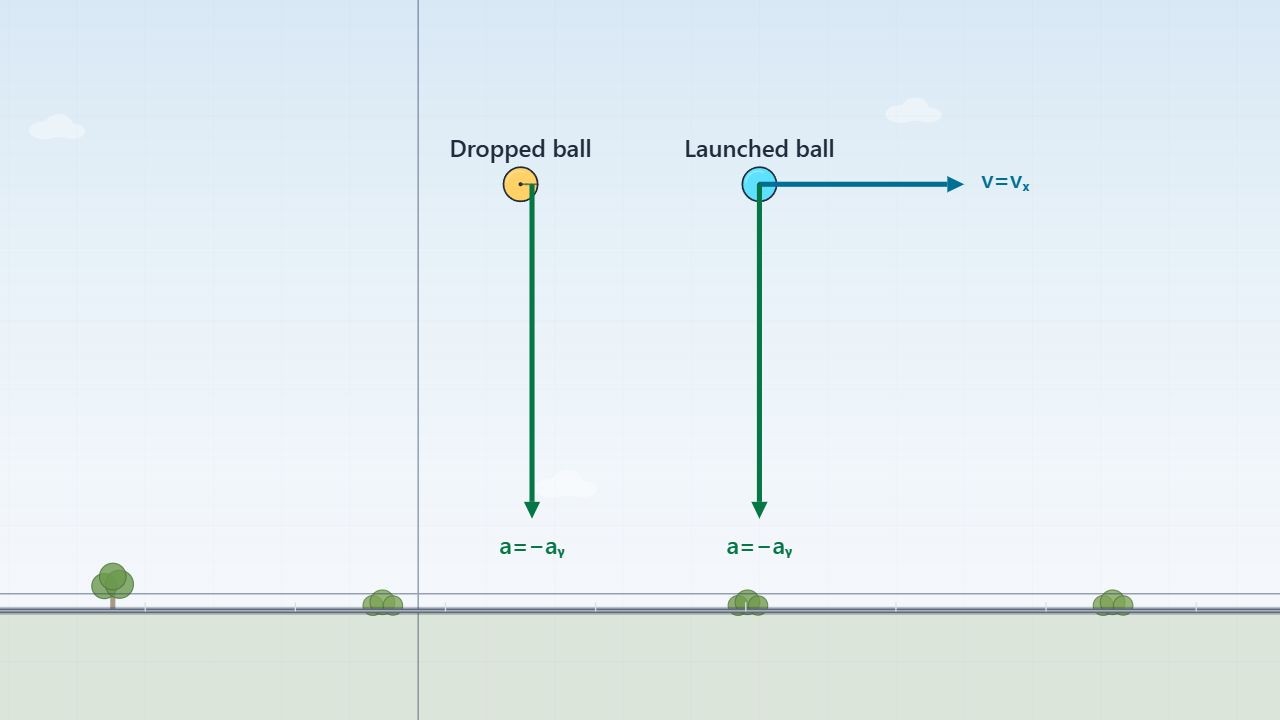
Compare objects released from the same height and test what determines flight time.

Read the flight

Use velocity components and motion graphs to explain the apex and the landing.

Aim for a target

Choose launch components and test a landing prediction in the simulation.

The big idea

The key ideas, at a glance.

One flight, one clock

Ignoring air resistance, horizontal velocity stays constant while vertical velocity changes under gravity. Both components share the same elapsed time.

The apex still has motion

At the highest point, vy = 0. Horizontal velocity can remain nonzero, and acceleration is still downward.

A quick comparison

Double horizontal speed while keeping height and initial vertical velocity fixed.

Flight time unchangedHorizontal range doubles

horizontal speed vhorizontal speed 2vSame vertical motion → same flight time
Teaching this topic?Classroom fit, AP connections, and support
Classroom fit
Use for a concept introduction, guided independent practice, or a projected class discussion.
Before students begin
Velocity components and constant-acceleration equations. Use a consistent vertical sign convention.
Built-in support
Prepared scenes, guided prompts, and feedback on lesson questions.
AP Physics 1 connections
Unit 1: two-dimensional kinematics and translating motion between representations.
Check for understanding
Ask students to identify the velocity and acceleration directions at the apex.
Optional extension
Try the separate Projectile Target Challenge.
Meet the educator behind Build Physics

Ready to test your thinking?

The first scene is set up. Start the lesson and explore.

Start lesson